
Open DWG and DXF files on your phone in seconds
In short: to open a DWG file on Android, install a DWG viewer such as Planlens, then open the file from Gmail, WhatsApp, Files or Drive with "Open with". Planlens converts the DWG and shows the plan; DXF files open directly on the phone. Zoom, switch layers, measure and share. No account, no subscription.
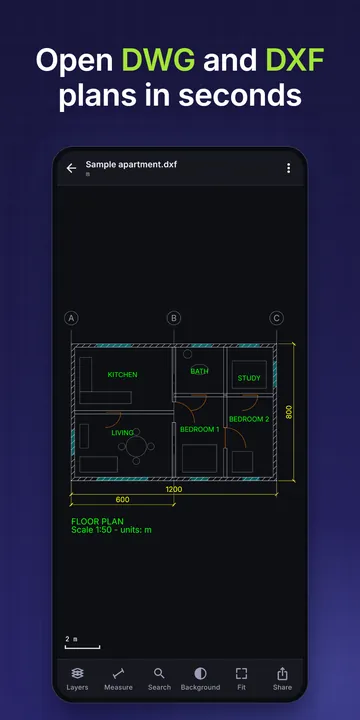
How to open a DWG file on Android
- Install a DWG viewer. Planlens opens both DWG and DXF and needs no account.
- Open the drawing from wherever it is. In Gmail, WhatsApp, Files or Drive, tap the file and choose Planlens, or use "Open a plan" inside the app.
- Wait a few seconds for a DWG. It is converted to DXF for display (see the privacy section below). A DXF opens at once, on the phone.
- Pinch to zoom, turn layers on and off, measure, search the text, then share or export what you need.
What Planlens does
Smooth zoom on big plans
Pan and pinch-zoom with inertia, and a Fit button that frames the drawing. Tested with a 20 MB plan of 135,000 objects on a mid-range phone.
Layers under control
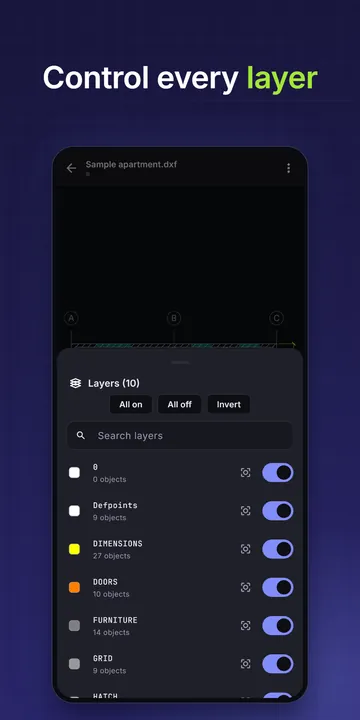
Switch layers on and off, show only one, invert, search by name. The layer state is remembered for each file.
Measure with snap points
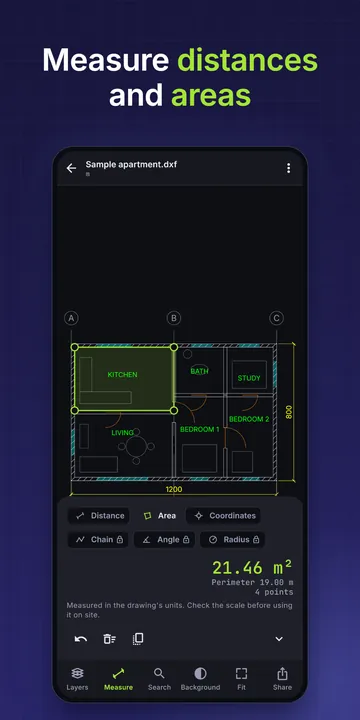
Distance, area and coordinates, with snapping to endpoints, midpoints, centres, intersections and perpendiculars. Units come from the drawing, and you can calibrate the scale.
Search the text of the plan
Find any text or label. The matches are highlighted and the view jumps to each one.
Layouts, dark or light
Pick a layout (paper space) when the file has several. Dark, light or automatic background, with a contrast boost for faint lines.
Export and share
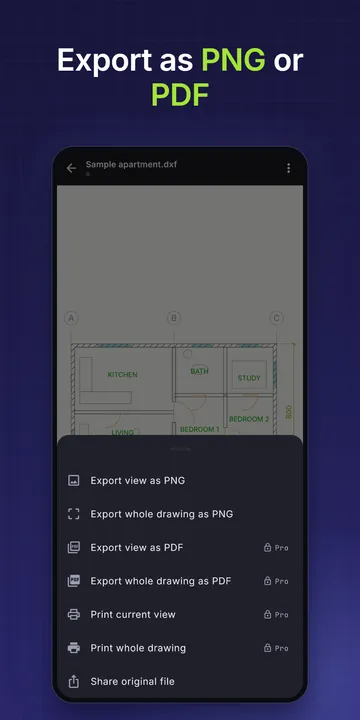
Export the current view or the whole plan as PNG with no watermark, and share the original file. PDF export and printing are part of the optional Pro purchase.
Screenshots from the app
DWG vs DXF: what is the difference?
DWG is the native drawing format of CAD programs. DXF is the exchange format: it was designed so that other programs can read a drawing. Both can hold the same lines, layers, text and blocks.
On a phone, DXF is the easy one. Planlens reads it directly, so the file never leaves your device. A DWG is converted to DXF first, then shown.
| DWG | DXF | |
|---|---|---|
| What it is | Native CAD drawing file | Open exchange format |
| In Planlens | Converted to DXF, then shown | Opens directly on the phone |
| Needs internet | Yes the first time; the converted copy is then saved on your phone | No |
Privacy: what happens to your DWG file
A DXF file is read on your phone and is never uploaded.
A DWG file is sent, encrypted, to our own conversion server in Frankfurt, Germany (European Union), converted to DXF, returned to your phone and deleted from the server right after. The converted copy is kept on your phone so reopening the plan uploads nothing. You can turn online DWG conversion off in Settings.
No account is needed and the app does not send your drawings anywhere else.
What Planlens is not
Planlens is a viewer, not an editor: you cannot draw or change a plan. It shows 2D drawings; 3D solids and some special objects are counted but not drawn. Check the scale of a drawing before you rely on a measurement on site.
Questions about opening DWG and DXF files on Android
How do I open a DWG file on Android?
Install a DWG viewer for Android such as Planlens, then open the file from Gmail, WhatsApp, Files or Drive and choose Planlens ("Open with" or "Share"). You can also tap "Open a plan" inside the app. A DWG is converted to DXF for a few seconds and then shown; zoom, layers and measuring work as with any plan.
What is the difference between DWG and DXF?
DWG is the native drawing format of CAD programs; DXF is the open exchange format that other programs can read. Both can carry lines, layers, text and blocks. On Android a DXF opens directly, while a DWG has to be converted to DXF first.
Is there a free DXF viewer for Android?
Yes. Planlens is free to use: it opens DWG and DXF, zooms, switches layers, measures distance and area, searches text and exports PNG with no watermark. It shows one small banner on the recents screen only, never over a plan. An optional one-time Pro purchase removes the banner and adds chain, angle and radius measuring, unlimited area points and PDF export.
Is my DWG file safe? Where does it go?
A DWG is sent encrypted to our own server in Frankfurt, Germany (EU), converted to DXF and deleted from the server right after. A DXF never leaves your phone. No account is needed. Details are in the privacy policy linked in the footer.
Can I open a DWG file offline?
A DXF, yes, always. A DWG needs a connection the first time so it can be converted; the converted copy is saved on your phone, so opening the same plan again works offline.
Can I edit or draw in Planlens?
No. Planlens is a viewer for reading plans on site or on the move: open, zoom, layers, measure, search, export and share. It does not edit drawings.
Which DWG and DXF versions does it open?
DXF in text form from release 12 to 2018 and binary DXF from release 12 to 2000. DWG files from release 2000 to 2018 were tested end to end. Very old DXF files from before release 12 are not supported. The format is detected from the content of the file, not from its extension.
Can I measure on a plan with Planlens?
Yes. You can measure distances (with the horizontal and vertical difference and the angle), areas with perimeter and absolute coordinates, with snapping to the points of the drawing. Units come from the file; if it has none you choose them. You can also calibrate the scale with a known length.
Which languages does the app speak?
English, Spanish, Portuguese (Brazil), German, French, Turkish, Russian, Indonesian and Hindi.
Open your next plan with Planlens
Someone sends you a DWG or DXF: open it, zoom into the detail, measure it and put the phone away.
Get Planlens on Google Play